Get documents signed, without breaking stride.
Place a signature field in the document and send: every signer gets a link and signs online. You track everything in real time, and the document comes back signed — with its proof certificate, in the folder where it has always lived.
Signature requests in your image
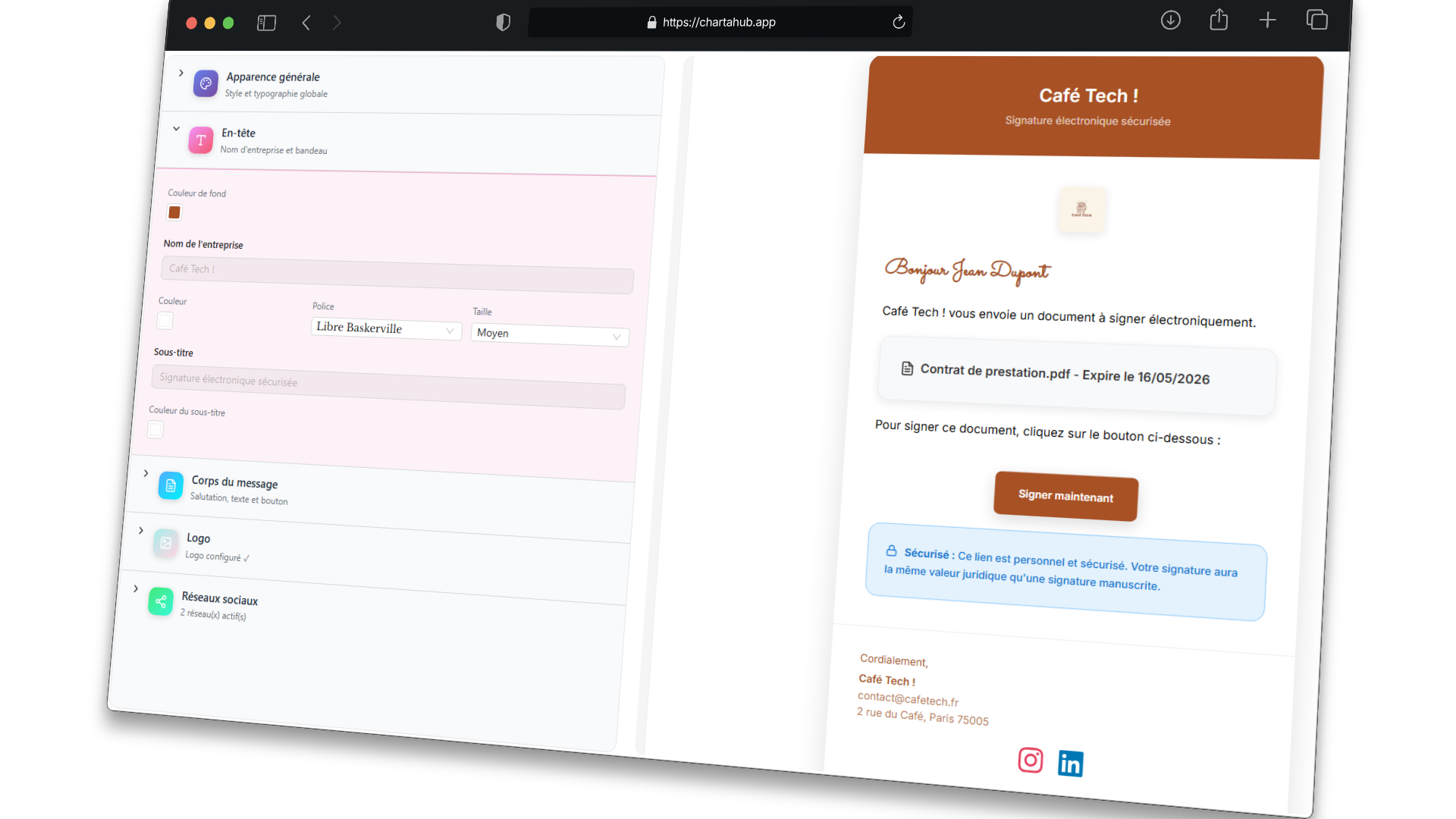
The email your signer receives carries your brand, not ours: logo, colors, font, accompanying message — configured once, applied to every send. A request that inspires trust right from the inbox.
Place, send, it's signed
In the editor, on the canvas or on an imported PDF: one "Signature" zone and the document is ready to go.
Each signer gets a link by email — no account to create, they sign online in two minutes.
The signed PDF replaces the original in its folder, proof certificate included.
Signers, not data entry
The send configuration fills itself: pick a CRM contact and the email and name follow. All that's left is deciding the order — or skipping one.
- Straight from the CRM. Select a contact: their details fill in on their own, editable by hand if needed.
- A signing order, if you want one. Simultaneous by default; one click to enforce 1st, 2nd…
- In the signer's language. Invitation and signing page in French, English or Spanish — chosen signer by signer.
Who signed, who's dragging
Every document in circulation has its status sheet: invitation sent, signed on… at…, declined with a reason. You always know where the request stands — without having to ask.
- Every signer's state, dated. "Invitation sent", "Signed on… at…": each step is timestamped on the document's sheet.
- Declines come with reasons. If someone declines, you know when and why — the reason is kept.
- Notified on open. A notification lands the moment your signer opens the document — you know it's moving before the signature even happens.
Reminders, on autopilot
Give the template a signature deadline — one week, two weeks — and Charta handles the rest: automatic reminders before the deadline, clean expiration after.
- Set once, on the template. Every document created from that template inherits the deadline and reminders.
- Reminders D-7, D-3, D-1. Late signers are chased by email at the right moments — without you lifting a finger.
- Clean expiration. Past the deadline, the request expires: no ghost link lingering in an inbox.
Signed, and provable
When the last signer has signed, the signed PDF replaces the original — same folder, "Signed" status, timestamped. And the proof is one click away: a global certificate for the document, plus one proof per signer.
- The final document, in the same place. No "signed" folder to maintain: the file is replaced by its signed version, right where it lived.
- A certificate citing the applicable law. eIDAS regulation (EU) No 910/2014 by default — or the ESIGN Act/UETA if you pick the US framework — with every step timestamped.
- One proof per signer. Each signature has its own certificate, downloadable from the document's sheet.
The same field, everywhere
Document written in the editor, composed on the canvas, or PDF imported as-is: the signature field works the same way everywhere.
📝 Signature
An inline signature zone, placed in the flow of the document.
A frame you place freely — contract footer, title block, wherever you want.
Your existing PDFs get signed too: drop the zone on top, send.
Frequently asked questions
Do my signers need to create an account?
No. Each signer receives a link by email and signs online, from any device — nothing to install, nothing to create.
Is the signature legally valid?
Charta produces a simple electronic signature (SES) with a timestamped proof certificate referencing eIDAS regulation (EU) No 910/2014 — the level used day to day for quotes, service agreements, NDAs or leases. Working under US law? Pick the US legal framework at send time: the certificate then references the ESIGN Act and UETA. For high-stakes documents, have a lawyer confirm the applicable regime.
What if nobody signs?
Automatic reminders go out before the deadline — D-7, D-3 and D-1 depending on the delay chosen on the template — then the request expires cleanly.
Where does the signed document end up?
Right where it was: the signed PDF replaces the original in its folder, the status switches to "Signed", and the proof certificate downloads from the document's sheet.